Project Overview
College recruiting information often arrives through email and requires someone to manually review each message and transfer important player details into a spreadsheet.
This project demonstrates how business systems and data integration can connect Gmail, Make.com, Regex parsing, Google Sheets, and Apps Script to reduce repetitive data entry.
The Challenge
Recruiting information had to be manually reviewed and transferred from emails into spreadsheets.
The Solution
Automatically identify recruiting emails, extract player information, and create structured spreadsheet records.
The Value
Reduce repetitive work and create a more organized recruiting review process.
The Business Problem
Recruiting emails contain valuable player information, but much of that information is embedded inside email subject lines and message content instead of a structured database.
Manually transferring this information takes time and can lead to inconsistent formatting or missed information.
The Automation Workflow
- Gmail monitors incoming recruiting emails.
- Make.com receives relevant email data.
- Regex and text parsing extract recruiting information from the email.
- Player information is separated into individual data fields.
- The information is mapped to the correct Google Sheets columns.
- A new player record is automatically added to the recruiting spreadsheet.
- Apps Script can further organize records based on location or other recruiting criteria.
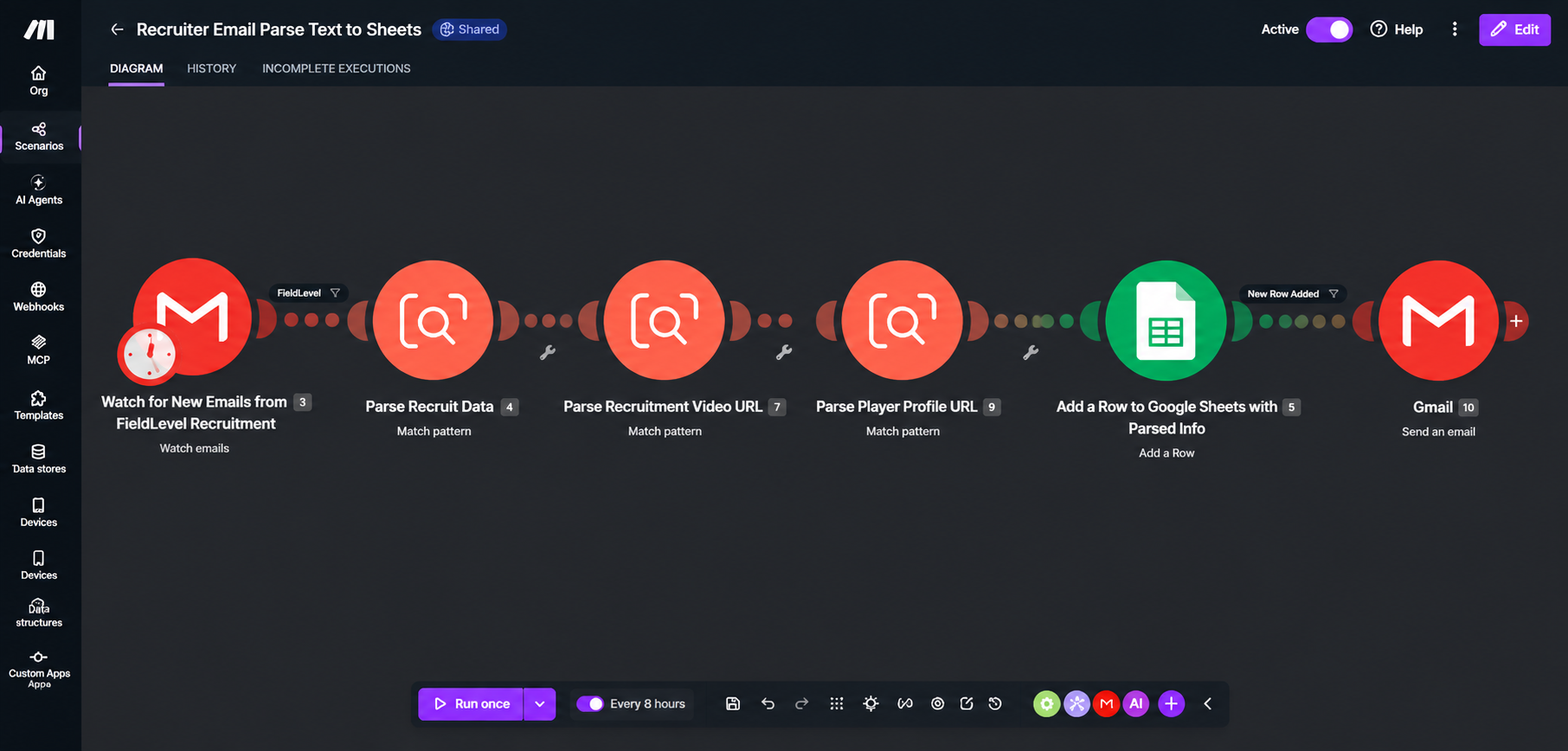
Recruiting Data Captured
- Date email received
- Class year
- Player name
- Position
- Height
- GPA
- City
- State
- Recruiting video URL
- Player profile URL
Data Organization
Google Apps Script can further organize recruiting records after they are added to the master spreadsheet.
For example, New Hampshire players can be routed to an in-state tab while players from other states can be organized into an out-of-state tab. This keeps the master data intact while making the recruiting information easier to review.
Estimated Time Savings
Before automation, each recruiting email required approximately 3–5 minutes to review the message, identify the relevant player information, and manually enter the data into the recruiting spreadsheet.
For every 100 recruiting emails, this represents approximately 5–8 hours of manual data entry.
With the automated workflow, player information is extracted, organized, and added to Google Sheets automatically. Staff can focus primarily on reviewing player information and handling exceptions rather than manually transferring data.
3–5 Minutes
Estimated manual processing time per recruiting email.
5–8 Hours
Estimated manual data-entry time per 100 recruiting emails.
Automated Entry
Player information is extracted and added to the spreadsheet automatically.
Business Value
- Potentially saves 5–8 hours of manual data entry per 100 recruiting emails.
- Reduces repetitive copying and pasting of player information.
- Creates consistent, structured player records automatically.
- Makes recruiting information easier to search, sort, and review.
- Reduces the chance of information being missed during manual entry.
- Allows staff to spend more time evaluating players instead of entering data.
- Creates a scalable workflow that can handle increasing recruiting email volume without a corresponding increase in administrative work.
Tools & Skills
Explore More Case Studies
Could a Process Like This Be Automated in Your Business?
Doe Farm Solutions helps businesses simplify repetitive processes and build practical workflow automation using tools that fit the business.
Schedule a Free 15-Minute Consultation Contact Doe Farm Solutions